
The 4-COMPONENT FRAMEWORK
to
MMO SURVIVAL SYSTEMS

Decide which digital assets to build
— and how to build it.
Without a system you start over every day and burn out before next Christmas
That’s why we Keep It Simple Stupid
and build the digital business infrastructure that runs your business.
No matter what type of online business you have, a good system is the foundation for creating, managing and growing your digital assets.
4 Components create a framework that will make better use of your time online,
the assets you create and
effectively run them with fewer headaches.
The aim is to
But where do you start?
First,
Grab this free Survival Guide
Inside you’ll find
– a compact selection of tools,
– The One-Step Survival Strategy
– and a curated list of resources
Then we look at how to
CREATE YOUR ONLINE BUSINESS BASE
Right, let’s dive into the map.
and 3 ways to get your online business out there.
Disclaimer:
Please note that not all but some of the links on this page are affiliate links. It costs you nothing to use them, but helps us keep these free resources running.
You can visit our Disclaimer policy page to learn more
BUILD YOUR HOME BASE
Website / Blog
Your online business needs an address.
Publish content, build authority, attract search traffic and direct visitors towards offers or services.

What does it take?
Getting Started
You’ll need a domain, hosting and a way to build and manage the site.
You’ll also need something worth putting on it,
whether that’s useful information,
products, services or a reason for people to get in touch.
And getting a website online is only the beginning.
People still need to find it.
That might mean search engines, social media, email,
paid advertising or a combination of traffic sources.
The upside?
You have a central destination for your business,
with more control over your content,
branding and customer journey.
You can build an asset that isn’t entirely dependent on the rules or reach of a social platform.
The trade-off?
You’re responsible for building it,
maintaining it and giving people a reason to visit.
Search traffic can take time, and publishing content doesn’t guarantee visitors.
And how you build it?
That’s changed quite a bit.
A website doesn’t have to be huge, complicated or expensive to get started.
Build what your business needs now, then expand when there’s a reason to.
I started with WordPress, and I still use it.
In fact, I’ve come back to building and managing my sites manually with WordPress because sometimes you want that level of control.
But that’s no longer your only option.
AI can now do much of the heavy lifting when it comes to building websites,
making the process more accessible if the technical side isn’t your cup of tea.
And if you can build a website with AI, why stop there?
You could build an app, too.
If you enjoy experimenting with ideas and turning them into something functional, take a look at Lovable.dev
…Or
you could
Open Your Shop
E-commerce / Digital Store
Got something to sell?
Set up shop with physical products, digital goods or downloads.
It could be a standalone store or part of a website.
You control the storefront and customer transaction, while fulfilment can happen in several different ways.
Ecommerce isn’t the same as Dropshipping
Ecommerce
is the broad category: you sell products through an online store.
You might buy and hold your own stock, manufacture products, sell digital products, use print-on-demand, or have someone else fulfil the orders.
Dropshipping
is one particular ecommerce model.
You list products without keeping the stock yourself.
When someone buys, the supplier ships the product directly to the customer.
That makes dropshipping much easier to start — but it also means you’re relying heavily on someone else’s products, pricing, stock levels, shipping and customer service.
Digital Store vs Affiliate Marketing
And there’s another important distinction:
promoting somebody else’s physical product as an affiliate isn’t the same as running an ecommerce business.
If you send someone to buy a product through your affiliate link, the merchant is running the ecommerce business.
You’re the affiliate.
How does one stock an online shop?
If you want to build your own ecommerce business, you first need to decide how you want to source and fulfil the products.
That’s where these platforms come in.
Instead of hunting suppliers yourself, get a searchable database of pre-vetted suppliers and research the products/margins before you commit.
And that’s why we don’t point you at one supplier directory and say “that’s the one.”
Three places worth investigating
Best supplier?
Really?!
“Best supplier” depends on the business you’re trying to build.
We list all three because there isn’t one “best” ecommerce model or supplier.
Your choice affects your margins, stock requirements, shipping,
customer experience and
how much control you have over the business.
The goal isn’t simply to get a store online — it’s to find a product, supplier and business model
that can actually survive once real customers arrive.
If you’re holding stock, your requirements are different from someone starting a drop-shipping store.
If you’re testing a product, your priorities are different again from someone looking for long-term wholesale suppliers.
And with dropshipping in particular, getting the supplier decision wrong can hurt before you’ve even had a chance to build momentum — poor margins, unreliable fulfilment, slow shipping or mediocre products can kill a store very quickly.
So don’t treat these as three companies I’m telling you to join.
Use them to Investigate your options,
compare suppliers and work out which model
actually fits the business you want to build.
Ecommerce & Dropshipping for Beginners and Solopreneurs
SaleHoo — for research and a more beginner-friendly starting point.
Learn ecommerce + research products + find suppliers + build the business.
SaleHoo combines a supplier directory with product research, market information and ecommerce tools, trends, Shopify importing, profit calculator, supplier reports, courses, etc.
It’s a useful option if you’re still figuring out what to sell, who can supply it and whether the numbers make sense before committing to a store.
And SaleHoo has been around for roughly two decades. That’s actually significant in this particular niche.
It isn’t some new drop-shipping guru who appeared because TikTok made “winning products” fashionable.
The founders and course instructors are people I learned and continue learning a lot from. SaleHoo’s public-facing site doesn’t expose everything equally.
Note: DIG DEEPER!
The paid membership gives access to the supplier directory, Market Research Lab, training and community, so you’re not really seeing the entire product from the public catalogue, but is definitely worth getting inside.
Traditional Dropship and Wholesale
Worldwide Brands is a dropship supplier directory for the more traditional wholesale route
Worldwide Brands is a long-established supplier directory focused heavily on genuine wholesale and dropship suppliers.
It’s worth looking at if you’re serious about finding suppliers and building a business around products rather than simply chasing the latest dropshipping trend.
Serious wholesale sourcing; certified wholesalers with millions of products; lifetime access, no recurring fee.
More directory/research than automated store operation.
You still deal with suppliers yourself.
Ecommerce and Automation
Let’s look at Syncee, for the more automated approach.
It’s a global B2B supplier marketplace,
with suppliers/brands and ecommerce integrations,
where automation is big,
and supplier relationships focus on US/Canada/UK/EU/Australia.
With Syncee one can move from dropshipping to wholesale.
Syncee is closer to a modern ecommerce platform: you can find products and suppliers and connect them with your store, with inventory, product and order information handled through the platform.
It’s worth investigating if your priority is reducing the amount of manual work involved.
Or
You Could
Grow Your Audience
Social Media Marketing or SEO?
Go where the people are.
Build an audience, start conversations and get noticed on social media platforms, without needing a full website first
Start where the people already are
Getting Started
You don’t necessarily need a SEO optimized website to establish an online presence.
You can start on social media, build an audience around a subject or interest,
and use that attention to develop a business.
Depending on the platform
and your approach, you might publish short-form videos,
share useful posts, start conversations,
build a community or demonstrate products and services.
You can promote your own offers, work with brands,
earn through affiliate marketing
or direct interested people towards a store or website.
What does it take?
First, choose a platform that suits both your audience and the kind of content you’re prepared to create.
There’s little point building your entire strategy around video if you hate making videos
— or choosing a platform simply because everyone says it’s the place to be.
You’ll need a recognizable presence,
offer value, and a way to keep people engaged.
Consistency helps,
but that doesn’t mean you need to spend your entire life
feeding the content machine – more tips on this further on.
The upside?
Social media can seem easier than building a website.
You can start posting without worrying about domains, hosting or web design — but you’re still playing by someone else’s rules.
Social media can be a starting point, a stand-alone channel or part of a larger business system.
As your business develops,
you may decide to connect it to a website,
email list or store
rather than relying on one platform for everything.
The trade-off?
You’re responsible for building it,
maintaining it
and giving people a reason to visit.
Organic search traffic can take time,
paid traffic can be expensive,
and publishing content doesn’t guarantee visitors.
Every platform has its own expectations and ever-changing rules,
you need to stay on top of how it wants people to use it.
Reach can fluctuate, algorithms change, accounts can be restricted,
or you simply find yourself losing momentum even
while constantly churning the hamster wheel of content creation and posting.
Creating content is one thing; keeping it consistent is another.
The right content creation tools,
a workable content calendar
and reliable scheduling tools can make a real difference.
You can explore the tools that help manage the workload on our Tools page,
or head to Courses if you’d rather build your social media skills first.
You don’t need to be everywhere.
Start where your people are, learn what works, and build from there.
Three routes.
Different demands.
And no rule saying you have to choose just one.
…that said, now is a good time to
look at how to
OPERATE IT
Online Business Systems
Asset management for digital businesses starts with the infrastructure that keeps everything running.
WOW!!!
That sounds BORING
It simply means
Your website, email list and customer relationships are valuable business assets
— but you need the right systems to build, manage and grow them without creating a tangled mess you’ll have to untangle later.
Get the foundations right first.

What are you looking into?
Hosting Services
If you’re building an online business, you’ll eventually need somewhere to put your website.
From registering domain names,
to hosting them,
every hosting package comes with certain criteria.
And this is where hosting gets unnecessarily confusing.
Choosing your Web Host
Getting Started
You don’t need to understand servers.
You just need to understand what you’re actually paying for.
And in case you’ve never done this,
Domain name registering and hosting is not the same thing.
They can sometimes come from the same platform, sometimes it’s worth keeping separate.
Let’s look at the 3 main differences:
Shared Hosting
With shared hosting, your website lives on a server alongside other customers’ websites.
You share the server’s resources, which is why this is generally the cheapest type of hosting.
That’s not automatically a bad thing.
For a new blog, affiliate site, small business site or simple WordPress website that doesn’t have huge amounts of traffic, shared hosting can do the job perfectly well.
The downside is that you’re sharing the underlying resources.
If your site eventually needs substantially more processing power, memory or traffic capacity, you’ll eventually want something stronger.
This is where most people should start.
VPS and Cloud Hosting
VPS = Virtual Private Server.
This is a different beast.
Instead of sharing a server in the same way,
VPS hosting gives your site a more controlled allocation of server resources.
Cloud hosting takes the idea further by running infrastructure across a cloud platform
and making it easier to scale resources as requirements change.
You pay more, but you get more capacity, flexibility and control.
This starts making sense when a website has significant traffic,
demanding applications, multiple sites,
or a business that simply cannot afford to have its hosting become a bottleneck.
What about “WordPress hosting”?
WordPress isn’t a type of hosting.
It’s the software that runs your website.
And WordPress is everywhere, so there is a huge market for hosting companies to specialize in it.
You can run WordPress on shared hosting, a VPS, cloud infrastructure or other hosting setups.
What companies call
“managed WordPress hosting”
means they take care of more of the technical work specifically for WordPress
— things such as updates, security, backups, performance optimization
and WordPress-specific support.
That’s particularly useful if you want to run a WordPress site
without
becoming the person responsible for maintaining the server underneath it.
Which means there isn’t one “best” type of hosting
Better to ask “How do I want this to work now, and at scale.”
→ Simple website / new online business
Shared hosting is usually enough.
→ The domain-first ecosystem
Meaning you will find a domain registrar like Spaceship offering domain registration, hosting and email under one roof, with affordable shared hosting and VPS available if you eventually need more power.
→ The all-round website builders
This gives you a broader hosting platform aimed at getting everything from
a simple website to WordPress, ecommerce, cloud hosting
or VPS online without requiring much technical knowledge.
Some like Hostinger also includes the use of AI tools
to lower the difficulty barrier even more around building out your system and assets.
→ Established WordPress site / business
Managed WordPress hosting can be worth paying more for.
For the managed WordPress step-up, SiteGround or Kinsta are good examples to
compare the difference in infrastructure when you consider how your site might scale.
At scale, this is important enough that performance, support, security and management justify paying more.
→ Virtual Private Server
For large or business-critical sites with demanding application, that needs serious performance and scalability,
VPS or cloud hosting like Cloudways may make more sense.
A VPS gives you more flexibility, but it also often means more technical responsibility.
You don’t necessarily need one just because your business is growing.
Imagine it as a slice of a physical server reserved for your use, with its own allocated resources
and more control than ordinary shared hosting.
Recap:
- Shared hosting: You share server resources with other websites.
- VPS hosting: You get your own allocated portion of a server, with more control and resources.
- Dedicated server: You rent the entire physical server.
That’s why we’ve included different types of hosting rather than pretending they’re interchangeable.
Email Service
Provider
NOW, there are some important points
that you should understand
before you choose an ESP.
Choosing the Right ESP
What makes an ESP special?
… dedicated servers for email traffic
… helps with deliverability
… ensures global compliance laws are followed.
Importantly, look at your purpose, volume, and frequency.
That will determine not just cost, but also that the service you opt-in for.
Different Job – Different ESP
Like hosting, ESP are not all the same either,
because they are tailored to serve different business models under different rules.
Let’s roughly group them:
ESP #1 → “I run an online business and need proper email marketing to suit my business model.”
ESP #2 → “My email operation has become sophisticated and I need automation/data.”
ESP #3 → “I sell products and my email needs to understand the shop.”
It’s helps to compare similarities and differences side-by-side
Side-by-Side Comparison
It’s helps to compare similarities and differences side-by-side
Looking at 5 types of bundles
Traditional email marketing, broadcasts, autoresponders, automation, landing pages
Email marketing + automation + transactional email + some ecommerce
Email marketing + automation; strong bulk sending
Email marketing + automation + funnels + webinars + ecommerce
Ecommerce email + automation + SMS/push; Shopify/WooCommerce/etc.
Compare some real-world examples
The point is email is a sensitive thing
– it’s personal.
A professional ESP takes privacy serious.
What you plan to send out falls into a “category”,
and there are huge differences between
Email being used for Newsletters vs Sending business mails, invoices and receipts
vs
a Dropshipping business with catalogue, frequent specials and updates etc.
For examples to research further, try:
AWeber
is the old-school email-marketing choice with broadcasts and autoresponders and landing pages more.
Moosend
is the more serious “I’m sending a boatload of email and want unlimited sends on autopilot” option.
Sender
is still very recognizably an email marketing platform, but it has grown enough to handle transactional email and ecommerce workflows.
OmniSend
Specifically targets ecommerce email marketing with SMS/push notification as added function for direct response.
The interesting one here is
GetResponse
– it’s the cleanest bridge between the two groups.
The higher tiers add webinars, ecommerce, abandoned carts, revenue reports, funnels, and a dedicated sending domain/IP.
How Email Can Help Your Business
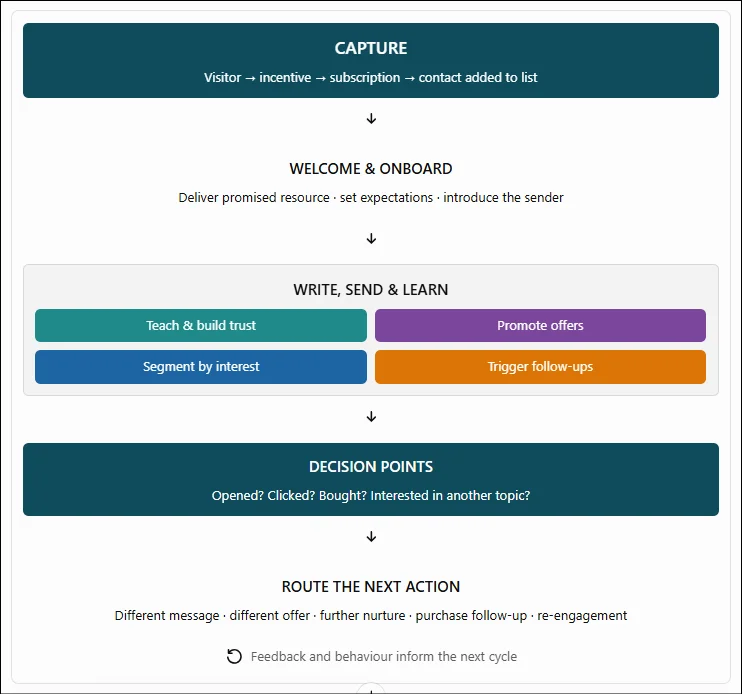
Want to learn email marketing?
CRM
Think leads, prospects, customers,
conversations, follow-ups and sales opportunities.
…a CRM
— Customer Relationship Management system —
helps you keep track of the people you do business with, or hope to do business with.
Choosing between CRM systems
What is it for?
Keep Track of the People Behind the Business
Instead of trying to remember who contacted you,
who needs a reply,
or where a potential sale stands,
you have a system to keep it organized.
So, do you actually need a CRM?
If you’re starting out with a website and a handful of affiliate links, probably not a complicated one.
You might need little more than a spreadsheet and a way to manage email subscribers.
But once you’re generating leads, building an email list,
selling products, following up with prospects or managing clients,
a CRM can help keep the wheels turning.
And here’s where things get a little confusing: some platforms offer a CRM as one part of a much bigger business suite.
That can be useful if you want your contacts, funnels, email marketing,
automations and sales process under one roof.
It can also mean paying for a lot of machinery you don’t need yet.
As always, the right choice depends on how you actually run your business
— not how many features a sales page can squeeze into a screenshot.
CRM vs CMS : What’s the difference?
Customer Relationship Management
vs
Content Management System
And no, a CRM isn’t the same as a CMS.
A CMS manages your website content;
a CRM manages your relationships with people.
A CMS like WordPress can run your website, for example,
while a CRM helps you manage the people who find you through it.
CRM, ESP, Automation: Who Does What?
These systems can overlap, and some platforms combine several functions.
But the underlying jobs are different.
CRM
Organises contacts, relationship history, leads and sales opportunities.
Your relationship records and follow-up desk.
ESP
Delivers marketing emails, newsletters and subscriber communications.
Your email communication center.
Automation
Connects actions, moves information and triggers processes when conditions are met.
The machinery that moves work along.
Analytics
Helps you understand performance through the data your tools collect.
Your feedback and measurement system.
A simple example:
Someone enquires about your service.
Your CRM might record the enquiry and remind you to respond.
Your automation might assign the lead or create a follow-up task.
Your email platform might send a relevant message.
Your analytics might help you measure the results.
One platform could handle several of those jobs.
Alternatively, you might use separate tools connected together.
These things
– Domain name, Hosting, ESP and CRM –
are the things you want to decide about wisely.
A domain name is kinda forever, and the others are also not the type of things you want to change mid-process.
You don’t need to build a complete command center from day 1 to run a small online business.
Choose the system that solves your current problem and leaves you room to grow.
Keen to know what I use?
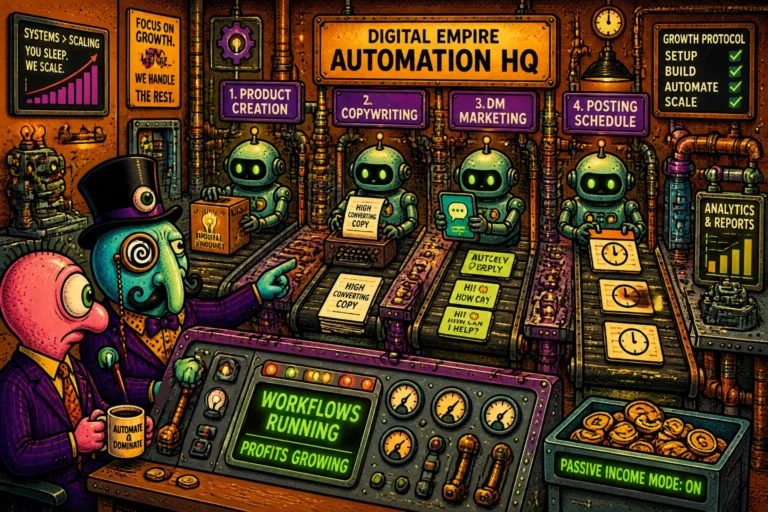
AUTOMATE YOUR WORKLOAD
And automation isn’t one thing.
When people say “automate your business,”
they can mean anything from making five apps talk to each other
to automatically answering a comment on Instagram.
Those are very different jobs — and they use very different tools.
So we’re separating the categories, and then looking at the tools that actually do each job.
So we’re separating the categories, and then looking at the tools that actually do each job.
1. Workflow automation
…makes your apps and systems talk to each other.
A form submission can trigger a spreadsheet update, add someone to your CRM, send an email, create a task and fire an API call — without you doing the admin dance yourself.
I’d say choosing a tool here is a face-off between skill, budget and workload.
That said, building workflows is probably one of the most useful skills to learn.
One of those skills you can apply in life too, not just business.
Choosing the right tool for the job will either make or break this for you, so let’s look at a few popular examples
The easiest serious visual option.
Build workflows by connecting apps, triggers and actions without needing to become a programmer.
n8n
For people who want more control — and don’t mind getting their hands dirty.
Particularly powerful for complex workflows, APIs and AI automation, with self-hosting available if you want to take charge of the whole thing.
Your apps should be talking to each other, not waiting for you to carry messages between them.
Pabbly Connect links more than 2,000 applications and lets you build multi-step workflows that move information, trigger actions and handle repetitive jobs automatically.
The cost-conscious option.
Its task-based pricing can make a lot of sense when you’re running plenty of external actions
and don’t fancy watching every little automation eat into your allowance.
Its appeal is the way it counts usage: triggers and many built-in steps — including filters, routers and formatters — don’t eat into your task allowance. That can make a real difference when your business starts running more workflows.
You can begin with a free account and build from there.
Less copying, less clicking, more time to run the business.
2. Publishing & Posting automation
Here automation can mean scheduling social posts, emails, campaigns,
appointments or other actions for a particular time
— rather than relying on your memory, your alarm clock or divine intervention to maintain consistency.
This function makes your content go out automatically,
but is not to be confused with the fact that it still needs you to feed it the original copy – as in the words.
You create your posts, load them into a scheduler,
and let it publish across your social accounts at the times you’ve chosen.
Some also handle recycling, queues, analytics and optimisation that reuses your original copy,
and output variations,
but do not expect it to behave like ChatGPT and research and write a piece from scratch.
Best to explain this is with examples
Publer
the straightforward workhorse
And my all-time favorite. It’s especially user-friendly to a newbie.
If you want one place to create, schedule and manage your social posts
– across different platforms – without taking on another expensive subscription, Publer is worth a look.
Best low-cost/simple entry point,
for scheduling, customization per network, Canva, link shortening/UTMs, calendar, etc.
Publer Business now includes competitor analysis + automatic recycling + recurring posts + Spintax + advanced analytics + best times + hashtag analytics + API/MCP.
So it can create different variations of evergreen posts rather than simply blasting the exact same wording repeatedly.
SocialBee
for keeping the content engine running and ongoing content strategy
SocialBee takes a more strategic approach.
Its strength is organising content into categories, recycling evergreen posts and
keeping your publishing schedule moving without constantly having to think of what to post next.
AI can generate strategy/posts and recommend posting times;
it also has content recycling, analytics and inbox.
This is what you want as a blogger or long-form publisher.
Metricool
Best for analytics + competitor intelligence.
You can compare your social performance with competitors, inspect their posts/interactions/engagement, and use that information to guide your own content.
Competitor analysis is available even on the Free plan for several networks, although paid plans unlock much more.
Sendible
Best for agencies / managing clients.
Workspaces, unlimited users, client/team collaboration, approvals, white-label reporting and multiple profiles are the real selling points.
It’s less “cool feature for a solo creator” and more “social media department in a box.”
Never stop dreaming big!
3. DM Response automation
…makes your social conversations respond automatically.
This is where social media gets a lot more interesting than simply posting something
… and hoping somebody notices.
Someone comments on a post, sends a message or mentions your business.
Instead of leaving that interaction sitting there until you get around to answering,
an automated system can respond, ask a question, deliver a link or guide that person towards the next step.
And that’s a rather useful trick when you’re trying to turn social activity into actual leads, rather than collecting likes like Pokémon.
Here’s a simple example:
Someone comments “INFO” → they receive an automatic reply → they’re invited into a DM conversation → they get the link or information they’re looking for.
You can use this to deliver lead magnets, introduce affiliate offers, recommend products, answer common questions, promote launches or bring potential customers into your sales funnel.
The clever bit? You’re not just automating tasks between apps.
You’re creating a way to respond to people at the moment their interest is sparked
— without having to be glued to your notifications all day.
Less chasing conversations. More opportunities to turn interest into action.
Take a look at SendPulse as an example of what’s possible.
To really understand the capabilities we can look at specific functions
3.1 Broader Automation Ecosystem
This goes beyond simple DMs.
It combines chatbots, email, SMS, CRM and automation,
so it makes sense if you want your social conversations to eventually become part of a bigger ecosystem.
SendPulse, again is a good example – easy to start with and just as easy to scale up and grow with
as it focuses on building a wider marketing/automation setup
rather than just automating social platform replies.
The ecosystem choice is not just about the size of your business,
but the various avenues of communication that helps your business reach more customers.
3.2 Social-DM Specialization
ManyChat is one of the established names in social messaging automation,
with a strong focus on turning comments, messages
and other social interactions into automated conversations.
LinktoDM is aimed squarely at the comment-to-DM workflow,
with a usable free tier and a low-cost route into automated social conversations.
This one is useful when you are new to automation and testing DM automation,
without immediately adding another hefty monthly bill.
3.3 Simple Creator Automation
CreatorFlow takes a more creator focused approach.
It’s built around the sort of things digital creators and affiliate marketers actually want to automate
— comments, DMs, links and lead capture —
without making you build an entire marketing department first.
Great for straightforward Instagram automation without a huge learning curve.
The important thing is that you’re no longer
manually jumping into every comment and sending the same darn message yourself.
But showing up you are!
Like clockwork.
And that’s what gives you a competitive edge.
That folks, that’s what automation does.
The difference boils down to how much control you want,
how technical you want to get,
and how much you’re prepared to pay as the workload grows.
If the whole automation intelligence and AI thing peaks your interest
ANALYZE, TRACK AND PROTECT
YOUR DIGITAL ASSETS
Traffic is nice.
Knowing what that traffic does is better.
You can have visitors, followers, clicks and dashboards coming out of your ears.
But are people actually doing anything on your site?
Which marketing channels are pulling their weight?
And, most importantly, what’s making money?
1. ANALYTICS
— FOLLOW THE NUMBERS
Analytics helps you answer those questions.
The trick is knowing which numbers you need to look at
because watching everything doesn’t automatically mean you understand anything.
You don’t need to measure everything.
You need to understand what’s happening, what’s working and where your effort is paying off.
As your online business grows, that means looking at three different things.
a) Website analytics
Understand what’s happening on your website
Getting visitors to your site is one thing.
Understanding what they do once they arrive is another.
Are they reading your content?
Clicking your links?
Scrolling past the important stuff?
Getting confused and leaving?
See how visitors behave
Visitor-behavior tools can help you see how people interact with your pages, using things like heatmaps and session recordings.
For example,
Hotjar lets you investigate where visitors click, how far they scroll and where they might be getting stuck.
Keep an eye on your affiliate marketing
If you’re running an affiliate site, you may also want to look beyond visitor behavior and examine how your website and affiliate marketing are performing.
AffiloTools is aimed at affiliate marketers, and especially beginner-friendly, who want a clearer picture of their website and marketing performance.
It’s worth investigating if you want affiliate-focused reporting rather than a general website analytics dashboard.
b). Business & marketing analytics
Bring your marketing numbers together
Once you’re using several channels, your performance data ends up scattered across social platforms,
email services, advertising accounts and website analytics.
Checking every platform individually makes it harder to see the bigger picture.
Bringing those numbers together can help you compare channels, monitor campaigns and spot what’s worth more of your time.
So we go looking for a system again and these are some of the handier ones out there, if you aren’t making your own apps by now.
The point isn’t to collect more charts.
It’s to make better decisions without spending half your day hunting for numbers.
Bring your marketing channels together
DashThis pulls data from supported marketing platforms into consolidated dashboards and reports.
It’s particularly useful if you want to see campaign performance across channels without manually assembling reports every time.
Keep an eye on business performance
Databox brings metrics from different data sources into dashboards designed to help you monitor performance and spot trends.
Think less “open twelve tabs and hunt for the numbers” and
more “put the important stuff where I can actually see it.”
c.) Revenue & performance analytics
What’s actually making money?
Clicks are nice.
Traffic is encouraging.
Engagement can tell you that something is happening.
They don’t necessarily tell you whether it’s profitable.
If you’re running affiliate campaigns or selling online, you need to connect the activity to the outcome: conversions, sales, commissions and revenue.
The 3 best places of approach:
Track the journey from click to conversion
If you want to understand which links and campaigns produce results, rather than simply counting clicks and hoping for the best,
a tool like ClickMagick focuses on
link tracking, conversion tracking and campaign optimization.
Connect affiliate conversions across networks
If you’re promoting offers through several affiliate networks, tracking commissions in separate dashboards can become a headache.
wecantrack consolidates supported affiliate conversion and commission data
and connects it with traffic and analytics sources,
helping you see which activities are generating affiliate revenue.
Understand your sales and customers
If you’re selling products yourself, the questions change slightly.
Which products are selling?
How much revenue are you generating?
Who are your customers, and are they buying again?
It’s less about what visitors do on a page and more about what happens when they become paying customers.
Putler is an immense help here – it consolidates sales and customer data to better understand revenue,
purchasing behavior and performance across supported payment and commerce sources.
The goal is to connect activity with results.
Otherwise, you’re just getting very good at counting clicks.
2. TRACKING
— FOLLOW THE CLICK, FIND THE MONEY
Putting an affiliate link on your website is easy.
Understanding what happens after someone clicks it is where things get more interesting.
Which campaign sent the visitor?
Which link converted? Where are your sales coming from?
And if you’re promoting offers across several affiliate networks, how do you bring those results together?
When you need to go deeper, there are two different jobs to consider.
Getting Started
You don’t need specialist tracking software just to manage your links.
Your website tools and ordinary affiliate workflow can handle the basics.
Dedicated tracking becomes useful when you’re running campaigns across multiple channels,
testing different approaches
or trying to understand exactly what’s producing conversions.
Tracking campaigns and conversions
If you’re actively running and optimising affiliate campaigns,
a tool such as ClickMagick
can provide a more advanced layer for tracking links, clicks, campaigns and conversions.
It’s for when you need more insight and control than a basic affiliate link can offer.
Consolidating affiliate results across networks
If you’re promoting offers through several affiliate networks, the problem changes.
You’re no longer just tracking clicks; you’re trying to connect traffic sources with conversions and commissions scattered across different platforms.
That’s where a tool such as
wecantrack
comes in, consolidating supported affiliate data and connecting it with analytics and traffic sources.
The key takeaway
Start with the tracking your existing setup provides.
Add specialist tools when your campaigns become complex enough to justify them.
More tracking isn’t automatically better — tracking that helps you make a better decision is.
The
LEAK FINDER
QUIZ
Other than leaks…
remember to
LOCK THE DOORS, FOR SAFETYSAKE!

3. CYBER SECURITY
…without becoming a paranoid digital doodah.
Building an online business means collecting a growing pile of accounts, passwords, customer information and website access.
You don’t need to become a cybersecurity expert, but you do need to stop making life easy for anyone who wants to get into your stuff.
Be sensible, protect your business, but don’t lose your mind over it.
As your online business grows, that means looking at three different things.
Start with the basics
use strong, unique passwords, enable two-factor authentication (MFA/2FA),
keep your software updated,
restrict who has access to your accounts,
and make regular backups you can actually restore.
Because security isn’t just about keeping trouble out.
It’s also about being able to recover when something goes wrong.
Protect your accounts
Between your domain registrar, hosting, website,
email service, affiliate networks and social accounts,
you’ll soon have more logins than you can comfortably keep track of.
Reusing passwords or storing them in a random text file isn’t a brilliant long-term strategy.
A password manager keeps your credentials organized and helps you use unique passwords without having to memorize the lot.
For example,
1Password
provides secure password storage and sharing, with additional features for managing sensitive information and credentials.
Protect your website
If you’re running WordPress, keeping WordPress itself,
your themes and plugins updated is essential.
Strong login security and reliable backups matter just as much.
A security plugin can add another layer of protection by scanning for malware, monitoring vulnerabilities and helping block malicious activity.
Wordfence,
for example, provides WordPress-focused security tools including a firewall, malware scanning and login protection.
Backup & Recovery
Even sensible security measures can’t guarantee that nothing will ever go wrong.
An update can break a site, an account can be compromised, or something important can disappear.
Keep independent backups, know how to restore them,
and make sure recovery doesn’t depend on one person remembering one password to one account.
The point isn’t to buy security for the sake of buying security.
Get the fundamentals right first,
then use specialist tools where they provide a worthwhile extra layer of protection.
And that’s The System in a nutshell.
Yes, a nutshell,
and goodluck for doing all that without the right tools.
I’m not going to kid you and candy-coat the process.
Doing this, setting it all up right?
It’s not a small task.
That’s why I harp on about having the right system and tools,
a community where you can ask humans,
and a plan to keep you on-track when things get slow or tough.

Next up we dive into
or you can